
C++ Conditions and If Statements
You already know that C++ supports the usual logical conditions from mathematics:
- Less than: a < b
- Less than or equal to: a <= b
- Greater than: a > b
- Greater than or equal to: a >= b
- Equal to a == b
- Not Equal to: a != b
You can use these conditions to perform different actions for different decisions.
C++ has the following conditional statements:
- Use
ifto specify a block of code to be executed, if a specified condition is true - Use
elseto specify a block of code to be executed, if the same condition is false - Use
else ifto specify a new condition to test, if the first condition is false - Use
switchto specify many alternative blocks of code to be executed
What is the if statement:-
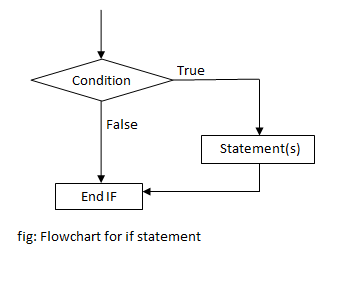
The if statement is used when conditional processing is required .A statement or set of statement is executed when the condition is true,otherwise these are skipped.
The syntax is:- if (condition)
{
//statement;
}
flow chat of if statement:-
EX:-
Write a program to demonstrate if statement
#include <iostream>
using namespace std;
int main() {
int x,y;
cout<<"Enter a first number:";
cin>>x;
cout<<"Enter a second number:";
cin>>y;
if(x>y){
cout<<"x is greater than y:";
}
return 0;
}
OUTPUT:-
Enter a first number:4
Enter a second number:3
x is greater than y:
what is an else statement:-
Use the else statement to specify a block of code to be executed if the condition is false
syntax of else statement:-
else {
// Code to execute if the condition is false
}
Example:-
#include<iostream>
using namespace std;
int main() {
int x,y;
cout<<"Enter a first number:";
cin>>x;
cout<<"Enter a second number:";
cin>>y;
if(x>y){
cout<<"x is greater than y:";
}
else{
cout<<"y is greater than x:";
}
return 0;
}
OUTPUT:-
Enter a first number:10
Enter a second number:20
y is greater than x:
Nested if else statement:-
A conditional staternent can be used within another conditional statement.This is called nesting conditional statement. if else condition within if else condition is called nesting if else condition.Multiway decisions arise there are multiple conditional and different action to be taken under each condition.
Syntax of nested if else statement in c++
if (condition1) {
if (condition2) {
// code to be executed
} else {
// code to be executed if condition2 is false
}
} else {
// code to be executed if condition1 is false
}
 Example:-
C++ program to find if an integer is positive, negative or zero
using nested if statements

#include <iostream>
using namespace std;

int main() {

  int num;

  cout << "Enter an integer: ";
   cin >> num;

  // outer if condition
  if (num != 0) {

    // inner if condition
    if (num > 0) {
      cout << "The number is positive." << endl;
    }
    // inner else condition
    else {
      cout << "The number is negative." << endl;
    }
  }
  // outer else condition
  else {
    cout << "The number is 0 and it is neither positive nor negative." << endl;
  }

  cout << "This line is always printed." << endl;

  return 0;
}
Output 1
Enter an integer: 35
The number is positive.
This line is always printed.
Output 2
Enter an integer: -35
The number is negative.
This line is always printed.
Output 3
Enter an integer: 0
The number is 0 and it is neither positive nor negative.
This line is always printed.
Switch statement
C++ Switch Statement:- The Switch statement provide an alternative to else if construct.Use the switch statement to select one of many code blocks to be executed.
syntax is:- switch(expression)
C++ Break statement:- The break statement is used to terminate control from loop statement or exit from switch statement.It can be used with for,while, do-while and switch statement.
syntax is:- break;
syntax of switch and break is:-
switch(expression){
case 1:
// code bolck;
break;
case 2:
// code block;
break;
dedault:
//code block;
}
This is how it works:
- The
switchexpression is evaluated once - The value of the expression is compared with the values of each
case - If there is a match, the associated block of code is executed
- The
breakanddefaultkeywords are optional, and will be described later in this chapter
Example:-
#include<iostream>
using namespace std;
int main(){
int day;
cout<<"Enter a Day:";
cin>>day;
switch(day){
case 1:
cout<<"Sunday";
break;
case 2:
cout<<"Monday";
break;
case 3:
cout<<"Tuesday";
break;
case 4:
cout << "Wednesday";
break;
default:
cout<<"Day does not found!";
}
}
OUTPUT:-
Enter a Day:2
Monday